Conversation and Coach together
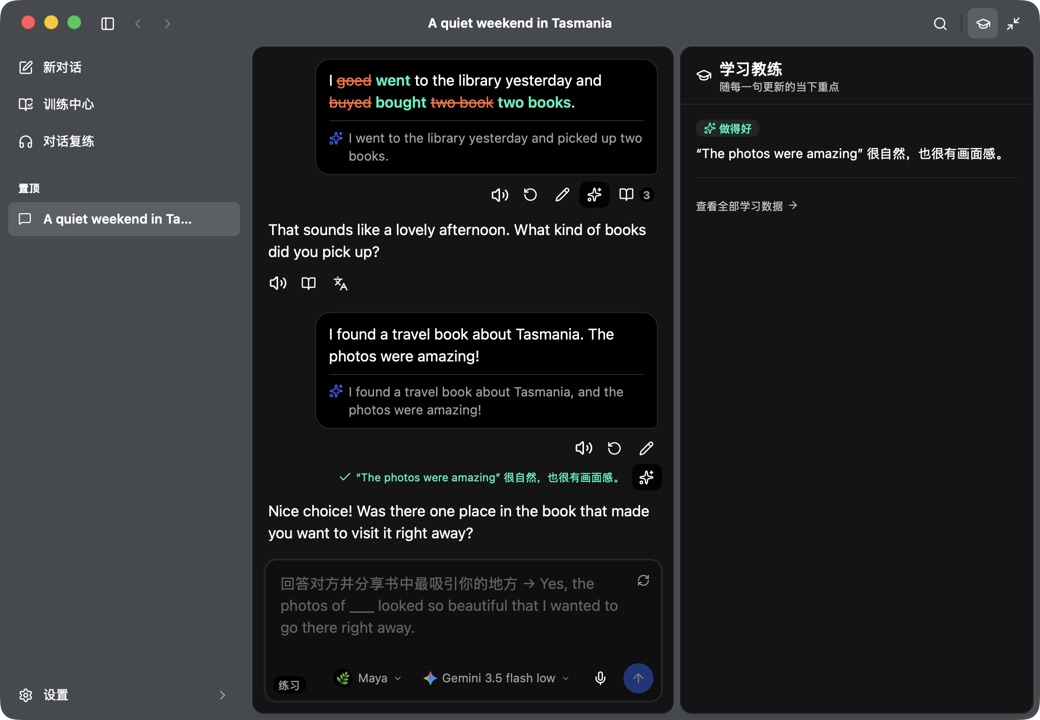
The reply streams first so practice still feels like a conversation; the tutor works in parallel and its feedback lands beside the turn, not after it.
 Converloop for Desktop
macOS available · Windows validated in CI
The roomy build. Longer sessions, side-by-side comparison, a learning record you can actually open and audit, and the tooling to turn a vague goal into a real practice plan.
What the desktop build is for
A big screen buys you two things a phone can't: several surfaces at once, and the patience to inspect a record instead of just trusting it.
The reply streams first so practice still feels like a conversation; the tutor works in parallel and its feedback lands beside the turn, not after it.
Mastery items, their evidence events, and the derived status all sit in local SQLite — open them, inspect them, correct them by hand.
Turn interview prep or a recurring expression gap into a learning project with observable can-do goals and lesson drafts.
Cropped to a single learner turn and its Coach feedback. The error span, the full correction, the natural alternative, and the explanation all have to be readable without opening the image.
macOS · 1400×900
app content only — the site draws the window
Evidence, not mysterious AI memory
Converloop keeps structured mastery records and the evidence behind them in local SQLite. The model can observe and propose; deterministic code owns counts, state changes, review selection, and persistence. Marking an item known records an explicit override — it does not invent a successful attempt or rewrite the evidence.
The learning data view opened on one recurring mastery item, showing its evidence events over time — error, correct, introduced — with the derived status visible.
macOS · 1400×900
app content only — the site draws the window
Error, correct, introduced, and gap events are all recorded with modality, assistance, elicitation, self-repair, and response latency.
Due items come from weakness plus an event-derived FSRS-lite stability and difficulty model, then weave back into conversation and training.
Inspect evidence, edit records directly, preview natural-language edits before writeback, and merge likely duplicate keys on confirmation.
What you already own gets reused for explanation and transfer, so the system isn't only pointed at your mistakes.
Conversation partners
Choose a distinct partner for an ordinary conversation, or bring 2–4 of them into a group chat with @Name routing, a primary speaker, mute, and leave controls. Each keeps their own identity, voice, accent, register, and pace — while sharing one learning-only profile. No partner builds a private relationship history.
A named 2–4 member group conversation mid-thread, with @Name routing visible and two partners having distinct identities. Show the primary speaker and at least one second perspective.
macOS · 1400×900
app content only — the site draws the window
Training and projects
Review is woven back into use rather than parked in a separate tab. Tap a recurring grammar point to diagnose and practise it in chat, run scenario practice, or build listening and dictation out of your own material with Conversation Replay.
Teacher-style sessions around grammar, an expression gap, daily review, or a goal you define yourself.
The Task Agent turns interview prep or a business-email need into a project with can-do goals, a first-attempt task, and a transfer task.
Bring in text, Markdown, CSV, JSON, or PDF locally to ground a project in a real task you actually have to do.
Write a drill as a `converloop/drill@1` Markdown document — frontmatter defines mechanics, body sections define prompts — then share it as one file.
Scenario practice, dictation, and weak-item quick-drill cards side by side, with a real due count on the quick-drill card.
macOS · 1400×900
app content only — the site draws the window
Capabilities
Every built-in capability — correction, explanation, bilingual reading, selection analysis, conversation actions — can be enabled, extended, or replaced. Write your own observers, conversation actions, and reply transformers, with proposal-based access to long-term memory and auditable runs.
Enable, disable, or nudge any built-in capability with your own instructions
Custom observers, actions, and reply transformers with guarded memory writes
Every run is auditable; memory writes stay proposals until code confirms them
Desktop craft
Fuzzy-find any action without leaving the keyboard.
Rebind what you use; the defaults stay out of the way.
Light, dark, and an accent colour that isn't mine.
Full UI in both, including onboarding.
The command palette over a conversation with a fuzzy query typed and several actions matched. Proves the keyboard-first side of the desktop build.
macOS · 1400×900
app content only — the site draws the window
Bring your own intelligence
Configure a provider once and it stays separate from your learning data. Local speech options can keep supported workflows on device.
Models
OpenAI-compatible endpoints, Anthropic, Gemini, plus Claude and ChatGPT subscription sign-in paths.
Speech in
Soniox streaming, OpenAI-compatible transcription, and local Parakeet or Qwen3-ASR.
Speech out
Edge Read Aloud and MiMo TTS, with per-partner voices.
Credentials
Device-bound encrypted storage. API keys and OAuth tokens never enter a backup.
Local-first by design
Get it
Packaged releases currently provide macOS builds for Apple Silicon and Intel. Windows is validated in CI and can be run from source.
Pick the Apple Silicon or Intel disk image from the latest release.
Download for macOS ↗Validated in CI; build and run from the repository while packaged installers are in progress.
View source ↗Free, open source, and yours to inspect.